Title here
Summary here
 Short (5-7 minutes)
TLDR - What this guide covers
A function is a set of triggers that performs a certain task. What do you want your triggers to do? Make the background pulse? Move text onto the screen? It’s essential to specify your function in the beginning, because it sets your workflow’s end goal. The more specifications you give to a function, the more complex the trigger setup.
For example, let’s say you want a system that increases a number when the player clicks. If you decide to add double clicks to this system by increasing a seperate number, the trigger setup becomes more complex.
Functions are your endpoint, but you still need the pieces to make the function work. That’s where modules come in.
A module is a trigger or group of triggers that serves the function. They are the parts that make a set of objects move, pulse, or rotate, the list goes on. What makes these modules special is their recursive nature - they can trigger other modules, which can then trigger other modules and so on. It’s good practice to label these modules and their links so that you don’t get lost in the creating process. With the function and module set in place, there is still an issue: they won’t know when to activate.
Whether you want one module to activate first or simultaneously, you will need to set the module’s Truth Conditions: they dictate when a module will activate. You’ll find some examples of these explained in the Spawn lesson.
Like language, there are many ways to paraphrase a function. These truth conditions can be stacked or used in many different ways. If you want to build a click counter, what modules and truth conditions can you use?
You can:
Each has its own benefits and drawbacks to consider for an efficient function.
Notice how the parts that make up the trigger workflow act like playing a piano: the sound coming from the piano is the function, the black and white keys are the modules, and your finger pressing the piano key is the truth condition. You can even say that the piano’s module is touch triggered.
For this section, have the GD Editor open with you; let’s apply this workflow to build some complex trigger setups.
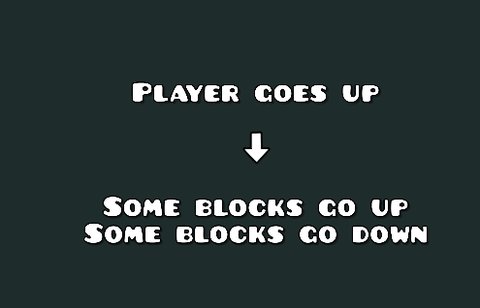
For this example, the gameplay will change depending on the player’s Y position. If the player’s height increases, some blocks will move up and others will move down.
Here’s a flowchart which shows its function:
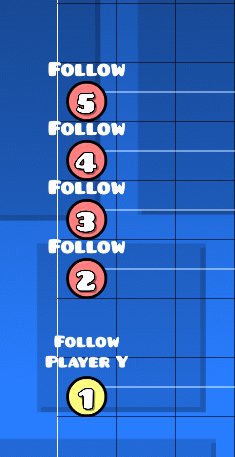
For the function, there are 2 modules you can use.
Follow Player Y trigger to lock an object to the player’s Y position.
Follow triggers & Y Mods to change how different blocks move.
The truth condition here will be the default: the triggers activate when the player passes by them.
This can also be combined with other modules: by using collision triggers as a truth condition, you can trigger other modules when the player’s at a certain height, or trigger things when the player’s in a certain direction.
Here, the background will pulse red when the player clicks once, and green when they double click. A double click will be defined as clicking twice within 0.25 seconds.
Here’s a flowchart which shows how this function works:
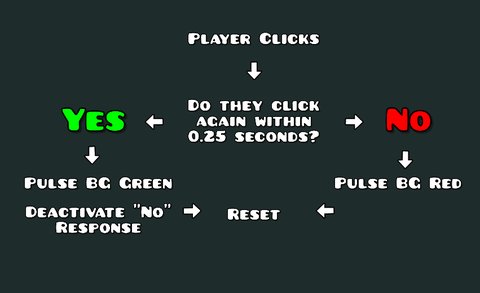
Here, we’ll use three modules in total:
Touch trigger that sets off the whole mechanism when the player clicks for the first time.
Module that detects when they click a second time,
and a Timer that can be easily reset.
To make this work, you can use a collision trigger & move triggers in conjunction. When the player clicks, the touch trigger activates a move trigger which moves a collision block instantly. If the player clicks twice, the block will therefore move into another collision.
We use a collision trigger to detect when the two blocks touch and use it to toggle another move trigger as a reset module that moves the collision block to its starting place. We also link the green BG pulse to this trigger to satisfy that initial condition.
To detect when the player’s only clicked once, we use a spawn trigger with 0.25 second delay to activate the reset module & the red BG pulse. However, this current setup messes up the whole function if the player spam clicks, so we’ll add a stop trigger that’s activated if the collision blocks touch & stops the spawn trigger before its delay is finished.
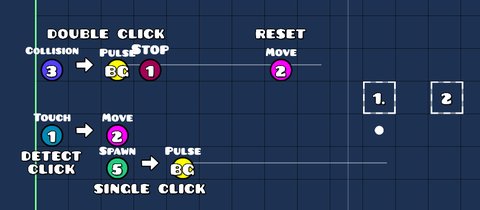
You can see when the triggers activate thanks to the BetterEdit mod.
Here, the pulse triggers are placeholders. We could replace them with new modules; say, a single click that cycles through options, and a double click that selects that option. The recursive nature of this workflow is what makes it so useful.
Know the specifics of what you want. If you list out what should happen under certain situations, you can make a flowchart that diagrams that to keep yourself organized. The specifics can get complicated, so test each module separately before putting them all together. You can use spawn triggers to simulate the truth conditions.
Relating to Minimum Viable Products, use placeholders to test if a module works. Having a piece of text show up or making a block pulse are both easy ways to test a module out. It doesn’t have to look good, it just needs to work.
Know the benefits and costs of each method. We will go through the benefits and costs of each truth condition in the future, but for now, know that each way of doing something will have its costs. You can use a Collision Trigger to implement something, but that could mean it’s harder to perform an action than using Instant Count triggers.
 and
sparktwee.
and
sparktwee.